Interactive Product Engineering
Skate Builder 3D.
An interactive 3D product configurator exploring real-time customization and product interaction.
- Personal project
02
Overview
Skate Builder is a browser-based skateboard configurator. A GLB deck model is re-coloured, re-scaled and re-finished live while you orbit around it — every change lands on the actual product, not on a preview swatch.
The interface is organised around four tools — Move, Resize, Paint and Texture — plus an undo/redo history. The workflow takes its cue from existing online skateboard builders; the interface and the implementation are my own.
- Context
- Personal project
- Contribution
- Concept, interface, 3D integration and front-end engineering.
- Stack
React 19/Vite/Three.js/React Three Fiber/Drei/React Postprocessing/Tailwind CSS
03
Problem
Product configurators live or die on feedback latency. Every choice — colour, size, finish — has to be visible on the real object immediately, and people need to experiment freely without the fear of losing a combination they liked.
04
Goals & requirements
- 01
Real-time tinting of the deck from 12 presets or any valid hex value.
- 02
Size control with snap presets and a fine-tune slider (0.4× – 1.5×).
- 03
Surface finishes expressed as physically-based material parameters.
- 04
Reversible experimentation through a proper undo/redo history.
- 05
A tool-based interface that frames the model instead of competing with it.
05
My role & contribution
Personal project — concept, interface design, 3D integration and front-end engineering.
06
Technical architecture
A single React component owns the configuration — colour, scale, finish and rotation speed — and the 3D scene is derived from it. The undo/redo history lives in refs rather than state, so recording a change never triggers an extra render.
- 01Interface
- Tool bar
- Colour / hex input
- Scale presets
- Finish picker
- 02State
- colour · scale · finish
- auto-rotate speed
- History stack + cursor
- 03Scene
- R3F Canvas
- OrbitControls
- Studio environment
- Bloom pass
- 04Model
- useGLTF deck
- Cloned + tinted materials
07
Technology stack
- React 19
- Vite
- Three.js
- React Three Fiber
- Drei
- React Postprocessing
- Tailwind CSS
08
Engineering decisions
- 01
Tint by cloning, never by mutating
Materials from the GLB are cloned and multiplied by the selected colour inside a memoised step. The cached source asset is never touched, so every change derives from the original texture rather than compounding on the last one.
- 02
Finishes as physical parameters
Matte, Gloss, Metal and Chrome map to roughness/metalness pairs (0.92/0.00, 0.08/0.12, 0.28/0.85, 0.00/1.00) instead of separate texture sets — one model covers every finish.
- 03
History as a data structure
Undo/redo is a snapshot array with a cursor held in refs. Pushing a new change truncates the redo branch — the same model text editors use, and easy to reason about.
- 04
Validate before you commit
The hex field accepts free typing, but only a complete #RRGGBB value updates the model and the history — partial input never produces a broken material.
09
Development challenges
- 01
Material churn
Each colour change produces fresh material clones. Disposing the previous set is the next optimisation to keep GPU memory flat across long sessions.
- 02
Dense controls around a 3D viewport
Four tools, presets, sliders and history all compete for space around the deck. Panels were pushed to the edges so the model stays the focal point at every viewport size.
- 03
Lighting that reads on a dark UI
A studio environment map with a very restrained bloom keeps glossy and chrome finishes legible without washing out the matte ones.
10
Interface details
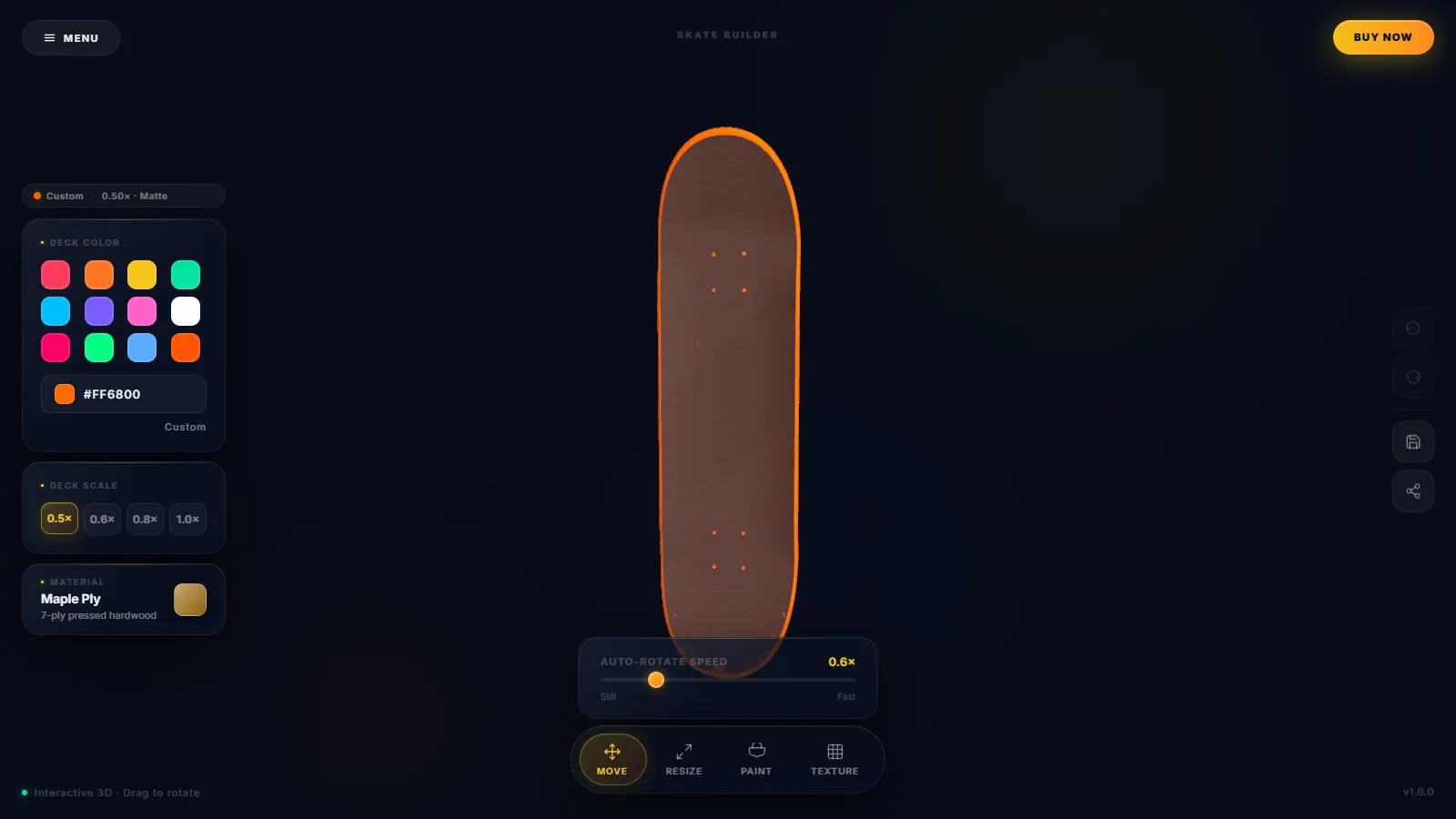
The left column holds deck colour, scale and material; the floating toolbar switches the active tool; the right rail carries undo, redo, save and share.
Magnified details of: Skate Builder 3D interface: an orange skateboard deck rendered in 3D, with colour, scale and material panels on the left and a Move / Resize / Paint / Texture toolbar below
11
Final implementation
The configurator is deployed and fully interactive: colour, hex input, scale, finish, auto-rotate speed and undo/redo all work in production. Save and Share currently give interface feedback only — persisting a configuration (for example, encoded in the URL) is the next milestone.
12
Results & lessons
Lessons
- 01
Undo/redo is a data-structure decision, not a UI one — choose the structure first and the buttons are trivial.
- 02
Physically-based parameters give far more range per kilobyte than additional textures.
- 03
A configurator is not finished until a configuration can leave the page. Persistence and sharing are the next engineering step.